Note
Click here to download the full example code
Document Python Code
A simple solution to insert Python source code into your document.
import pylatex as pltx
from pylatex import NoEscape
from latexdocs import Document
from latexdocs.preamble import append_packages, append_cover, __default__packages__
from copy import copy


listings_config = r"""
\definecolor{mygreen}{rgb}{0,0.6,0}
\definecolor{mygray}{rgb}{0.5,0.5,0.5}
\definecolor{mymauve}{rgb}{0.58,0,0.82}

\lstset{
  backgroundcolor=\color{white},   % choose the background color; you must add \usepackage{color} or \usepackage{xcolor}; should come as last argument
  basicstyle=\footnotesize,        % the size of the fonts that are used for the code
  breakatwhitespace=false,         % sets if automatic breaks should only happen at whitespace
  breaklines=true,                 % sets automatic line breaking
  captionpos=b,                    % sets the caption-position to bottom
  commentstyle=\color{mygreen},    % comment style
  deletekeywords={...},            % if you want to delete keywords from the given language
  escapeinside={\%*}{*)},          % if you want to add LaTeX within your code
  extendedchars=true,              % lets you use non-ASCII characters; for 8-bits encodings only, does not work with UTF-8
  firstnumber=1000,                % start line enumeration with line 1000
  frame=single,                        % adds a frame around the code
  keepspaces=true,                 % keeps spaces in text, useful for keeping indentation of code (possibly needs columns=flexible)
  keywordstyle=\color{blue},       % keyword style
  language=Octave,                 % the language of the code
  morekeywords={*,...},            % if you want to add more keywords to the set
  numbers=left,                    % where to put the line-numbers; possible values are (none, left, right)
  numbersep=5pt,                   % how far the line-numbers are from the code
  numberstyle=\tiny\color{mygray}, % the style that is used for the line-numbers
  rulecolor=\color{black},         % if not set, the frame-color may be changed on line-breaks within not-black text (e.g. comments (green here))
  showspaces=false,                % show spaces everywhere adding particular underscores; it overrides 'showstringspaces'
  showstringspaces=false,          % underline spaces within strings only
  showtabs=false,                  % show tabs within strings adding particular underscores
  stepnumber=2,                    % the step between two line-numbers. If it's 1, each line will be numbered
  stringstyle=\color{mymauve},     % string literal style
  tabsize=2,                           % sets default tabsize to 2 spaces
  title=\lstname                   % show the filename of files included with \lstinputlisting; also try caption instead of title
}
"""

class MyDocument(Document):

    def init_doc(self, **kwargs) -> pltx.Document:
        """
        Initializes the document. This covers appending packages
        and the preamble.

        """
        dcls = self.__class__.documentclass
        kwargs['documentclass'] = kwargs.get('documentclass', dcls)
        kwargs['geometry_options'] = self._geometry_options
        doc = pltx.Document(**kwargs)
        packages = copy(__default__packages__)
        packages['verbatim']
        packages['listings']
        packages['color']
        doc = append_packages(doc, packages)
        doc.preamble.append(NoEscape(listings_config))
        doc = append_cover(doc, self._title, self._author, self._date)
        return doc

doc = MyDocument()

import inspect

#pycontent = open('plot_2_pycode.py').read()
pycontent = inspect.getsource(MyDocument.init_doc)
#\lstinputlisting[language=Python]{source_filename.py}

content = r"""
\begin{env}[language=Python]
{content}
\end{env}
""".format(env=r'{lstlisting}', content=pycontent)
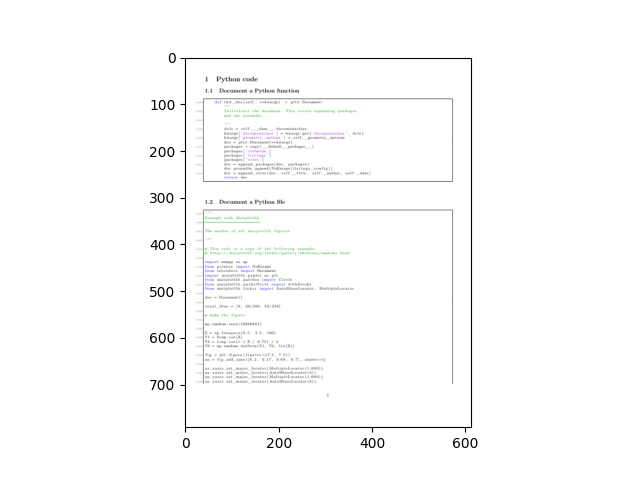
doc['Python code', 'Document a Python function'].append(NoEscape(content))

content = r"""
\lstinputlisting[language=Python]{plot_1_mpl.py}
"""
doc['Python code', 'Document a Python file'].append(NoEscape(content))

doc.build().generate_pdf('python_code', clean_tex=True, compiler='pdflatex')
import pypdfium2 as pdfium
import matplotlib.pyplot as plt

pdf = pdfium.PdfDocument("python_code.pdf")
page = pdf.get_page(0)
pil_image = page.render_topil()
plt.imshow(pil_image)
<matplotlib.image.AxesImage object at 0x7f33c50d7460>
Total running time of the script: ( 0 minutes 1.325 seconds)